How to Fix Instagram Line Breaks (Clean Caption Formatting Tips)
Instagram captions often look perfect while drafting your post—but once posted, all spacing disappears. Paragraphs collapse, lists turn into bundle of text, and meticulously planned formatting is lost. And you wonder what I did wrong. This is one of the most common frustrations creators face on Instagram while publishing post or reels.
This guide/blog explains why Instagram removes line breaks, what actually works in 2026, and how creators reliably preserve clean caption formatting without hacks that break later.
Why Instagram Removes Line Breaks
Instagram does not treat captions like standard text editors. Captions are normalized before rendering, which means extra whitespace and empty lines are often stripped.
- Multiple newline characters are collapsed
- Leading and trailing spaces are removed
- Some invisible characters are deleted during edits
- Formatting may change after post edits
This behavior is especially aggressive when captions are copied from Notes or Docs, or when captions are edited after publishing.
Common Line Break Fixes That Stop Working
Many creators rely on tricks that appear to work temporarily but fail later:
- Adding dots or hyphens between lines
- Using multiple spaces or tabs
- Editing captions after posting
- Copying formatted text from other apps
These methods are inconsistent because Instagram re-processes captions during updates.
The Method Creators Actually Use
The most reliable solution uses invisible Unicode characters that Instagram does not collapse. These characters act as real spacing anchors.
- Not visible to users
- Preserved by Instagram
- Safe and standards-compliant
- Effective across posts, Reels, and Facebook
Use the Invisible Line Break Generator
👉 Invisible Line Break Generator
Real Caption Formatting Example
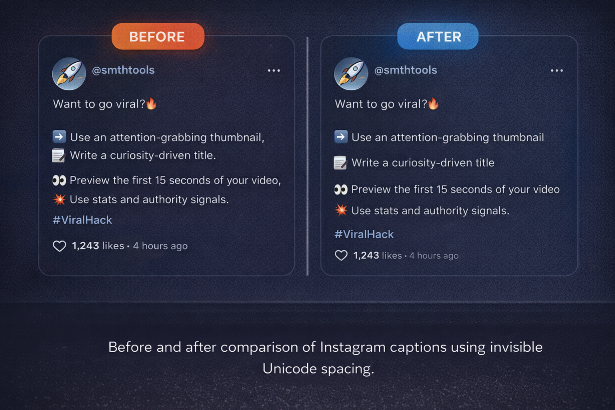
Before (collapsed):
After (clean spacing):
Final Tips for Clean Instagram Captions
- Use invisible spacing instead of empty lines
- Avoid editing captions after posting
- Preview captions before publishing
- Keep hashtags grouped at the bottom
- Stay within character limits